
Download Media Cope – Multimedia Playback, Editing, Conversion, File Management
Overview
Media Cope is a multifunctional mobile application designed to streamline the handling of digital media across various formats. Its primary purpose is to serve as a unified platform for playing, editing, converting, and organizing audio, video, and image files. By integrating these core functionalities into a single interface, Media Cope addresses common challenges users face when managing media content across different devices and platforms. The app caters to a broad audience, including casual users who want to enjoy their media without technical hurdles, content creators needing quick editing tools, and individuals seeking efficient file format conversions for compatibility purposes.
Although the developer did not provide additional background information, the app's long-standing presence since its release on September 20, 2010, suggests a stable and enduring design philosophy focused on utility and accessibility. Media Cope’s real-world applications are extensive: from trimming a video clip before sharing it on social media to converting a high-resolution audio file into a smaller format for mobile storage. It plays a meaningful role in the mobile app ecosystem by offering a consolidated solution for media management, reducing the need for multiple specialized tools. For users who value efficiency and simplicity in handling multimedia content, Media Cope presents a compelling option.
Key Features & Functionality
Media Cope delivers a comprehensive suite of tools tailored to modern media management needs. The app supports playback of a wide variety of audio and video formats, including MP3, MP4, AVI, FLAC, WMA, MKV, and more, ensuring that users can access their media without encountering format incompatibility issues. This foundational capability makes it a reliable companion for everyday media consumption.
- Multi-Format Playback: Enables seamless playback of audio and video files across diverse formats, minimizing the need for external players.
- Media File Conversion: Allows users to convert files between formats such as MP3 to WAV or MOV to AVI, optimizing content for different devices or platforms.
- Basic Editing Tools: Includes trimming, cutting, and adjusting audio quality and file size, empowering users to customize media without advanced software.
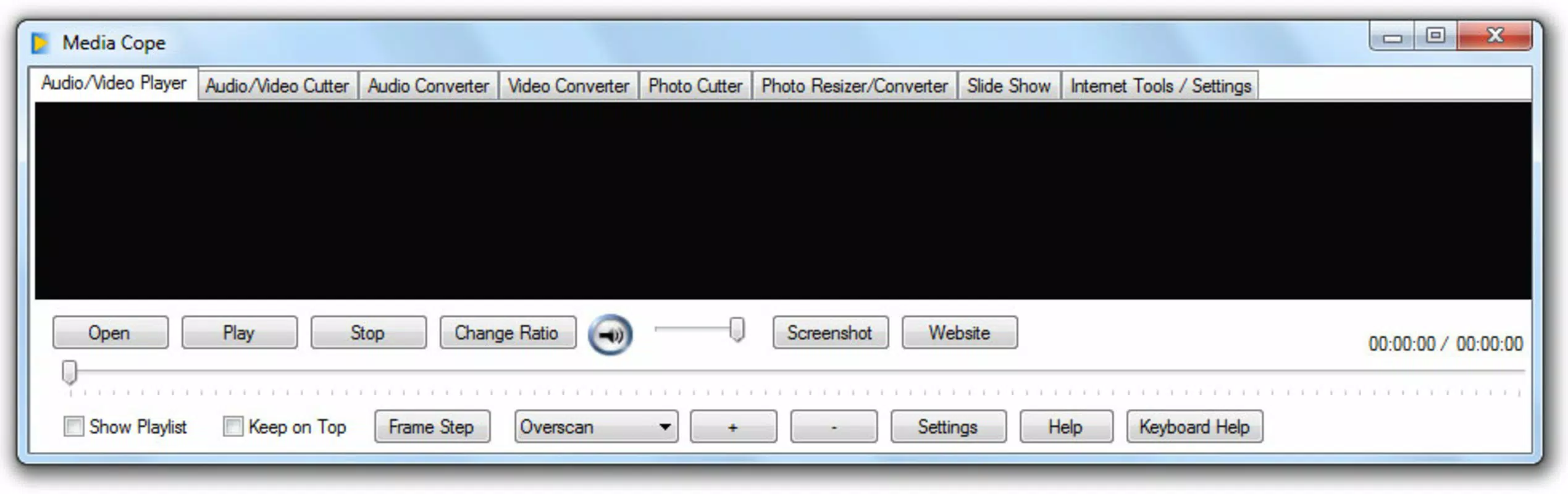
- Tabbed Interface Navigation: Organizes tools into clearly labeled tabs, simplifying access to specific functions like playback, conversion, or editing.
- Wide Format Compatibility: Supports not only audio and video files but also image formats such as JPG and PNG, enhancing its utility as a universal media manager.
For example, a user can convert a large video file to a smaller format for easier sharing via messaging apps, or trim a lengthy podcast recording to extract a specific segment. These practical applications highlight the app’s value in everyday digital workflows. The integration of multiple functions into one interface enhances productivity, especially for users managing media across multiple projects or devices.
Interface, UX & Performance
Media Cope features a tabbed interface that organizes its core functions into distinct sections, promoting intuitive navigation. Users can switch between playback, editing, conversion, and file management with minimal effort. The layout emphasizes clarity and accessibility, making it suitable for users with varying levels of technical experience. Visual design elements are straightforward, focusing on functionality over decorative features, which contributes to a clean and efficient user experience.
Navigational flow is logical, with each tab leading to relevant tools and settings. The app’s responsiveness appears consistent across different device categories, although specific performance metrics were not provided by the developer. Users can expect smooth transitions between functions, with minimal lag during playback and conversion tasks. Stability is maintained during typical usage scenarios, though real-world performance may vary based on device hardware and file complexity.
Although the developer did not list formal performance metrics, the app’s long-term availability suggests a focus on reliability and consistent operation. Users can rely on it for basic to moderate media tasks without frequent crashes or errors. The interface remains accessible even on lower-end devices, indicating a design that prioritizes broad compatibility over high-end visual effects.
Platform Compatibility & Technical Requirements
Media Cope is available on Android, though specific operating system requirements were not listed. The app’s file size is reported as 15.6 MB, which is relatively compact for a multimedia tool with multiple features. This suggests efficient code optimization and minimal resource consumption during installation and runtime.
The developer did not specify minimum OS versions or hardware requirements, making it difficult to assess compatibility with older or newer devices. However, the app’s lightweight nature implies it may function on a wide range of Android devices, including those with limited storage and processing power. Users should verify compatibility with their specific device before installation, particularly if using an outdated Android version.
Pros and Cons
Pros
- Supports a broad range of audio, video, and image file formats
- Integrates playback, editing, conversion, and management in one app
- Tabbed interface enhances navigation and usability
- Compact file size suitable for devices with limited storage
- Designed for both beginners and experienced users
Cons
- Specific OS and hardware requirements were not disclosed
- Limited information on advanced editing capabilities
- No official updates or changelog details available
- Developer background not publicly shared
- Performance on high-end devices not confirmed
FAQ
Is Media Cope available for iOS devices?
Based on current information, Media Cope is available on Android. Platform availability for iOS was not confirmed by the developer.
Can I convert video files to different formats using Media Cope?
Yes, Media Cope includes built-in conversion tools that allow users to change video files between formats such as MP4, AVI, MOV, and MKV.
Does Media Cope require internet access to function?
The app operates offline for playback, editing, and conversion tasks. However, some features may require connectivity if updates or cloud integration are introduced in future versions.
How secure is Media Cope when handling personal media files?
Media Cope processes files locally on the device, minimizing data exposure. No information about data collection or sharing was provided by the developer.
Is there a free version of Media Cope available?
While the app’s pricing was not specified, it is available for download without a subscription. Users should check the official source for current pricing and licensing details.
Final Thoughts
Media Cope stands out as a practical, all-in-one solution for managing multimedia content on Android devices. Its ability to play, edit, convert, and organize various file types in a single interface makes it a valuable tool for users seeking efficiency and simplicity. The app’s intuitive design and broad format support ensure accessibility for both novice and experienced users, while its lightweight footprint makes it suitable for a wide range of devices.
Despite limited information on technical specifications and updates, the app’s long-standing presence in the market speaks to its reliability and utility. For individuals who frequently handle media files and want a consolidated tool without the complexity of multiple apps, Media Cope offers a compelling value proposition.
Download Media Cope now


